Milestone 4
Prototype, Presentation, and Final Demo
System Concept and High-Level Architecture
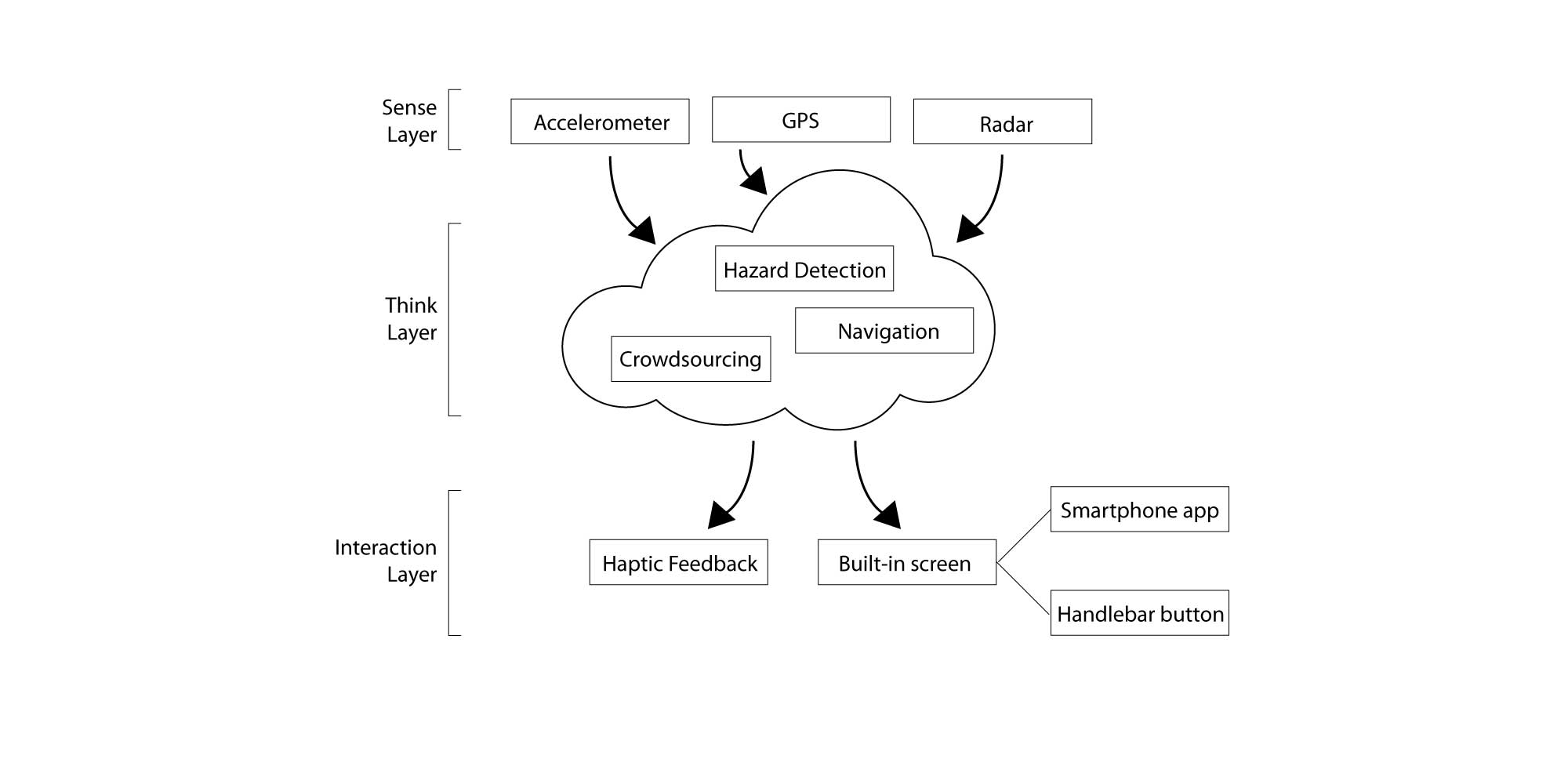
Our system concept uses sensors, crowdsourcing technology, haptic feedback, and a built-in screen to alert scooter drivers about potential safety hazards. These features were chosen because our previous user research indicated scooter drivers were most concerned about road conditions and most wanted advanced warning of potential hazards. We believe our concept could be built within 5 years. All of the components already exist. The bulk of the time would be needed to build the crowdsourcing algorithm.
Sensors
Built-in accelerometer sensors on the scooter would record vibrations, which would be used to infer road hazards like rough terrain. Accelerometers would also sense changes in speed in order to predict traffic patterns such as busy walkways or congested roadways. Radar sensors would be used to detect oncoming vehicles such as cars, bikes, or other scooters.
Crowdsourcing
Aggregated data from the accelerometers in our scooters would be used to alert drivers about real-time road conditions and traffic. An algorithm would analyze the data to determine the likelihood of a real hazard or traffic back-up so that one-off events would not trigger alerts for all users. However, a key component of our algorithm is its tendency to provide false positives (show that hazards are present when they are not) instead of false negatives (show that hazards are not present when they are) so that safety is the priority. Users could also manually add icons to indicate hazards they’ve encountered.
Haptic Feedback
Our system includes two levels of haptic alerts, depending on the alert type. Any time a safety alert is triggered, such as a potential collision or upcoming terrain issue, the user would feel repeated short vibrations in the handlebars until the hazard has passed. With this feedback the driver would know to increase awareness of their surroundings without needing to take their eyes off the road. One longer vibration would be used for non-safety alerts such as traffic and low battery warnings. This way drivers would always be notified about problems during their ride, and still easily distinguish between critical and non-critical alerts. Haptic feedback would be fully integrated into the handlebars so that the alert-related vibration drivers feel would be clearly different than any vibration caused by road conditions.
Built-in Screen
Our concept includes a built-in screen that serves two main purposes. (1) It would work seamlessly with the user’s scooter rental app so that a driver could input their destination on their phone app and see the navigation on the scooter screen. (2) The built-in screen would describe the alerts provided by haptic feedback.
Interaction with built-in screen
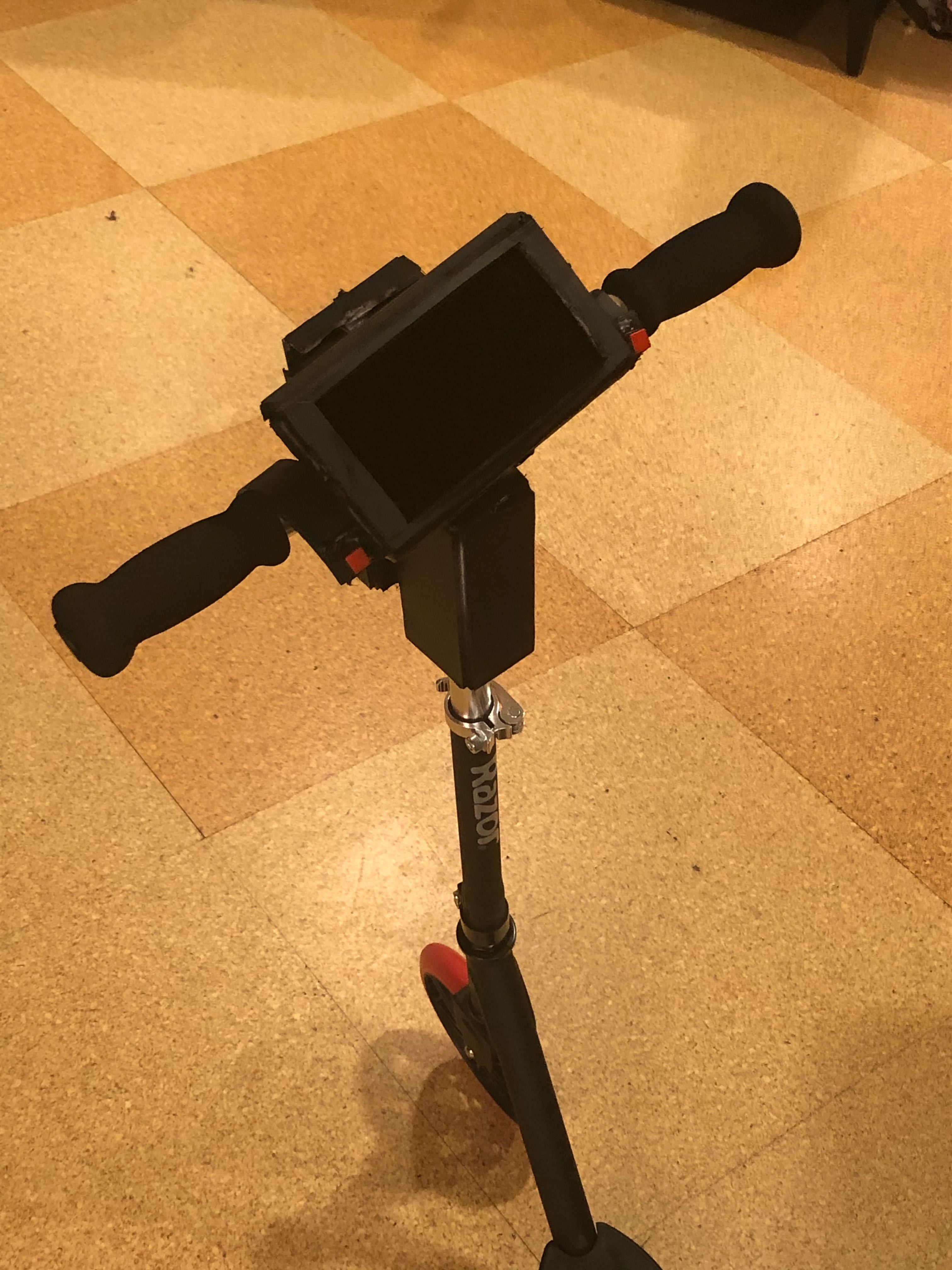
Since it would not be safe for a user to take their hands off the handlebars and touch the built-in screen, we included buttons on the handlebars drivers can use for screen interactions such as dismissing alerts.
High Level Architecture Diagram
Goals for the Demo
With our demo, we felt that we would be able to include a majority of the central functions and interactions of our system. The wireless connection between the rider’s smartphone (through the scooter rental application) and the scooter itself is replicated by having the driver enter their destination on a mockup of the phone app. Directions to the destination then show up on the scooter’s onboard screen, simulating the navigation component. The crowdsourced aggregation of data is simulated by the scooter warning of an upcoming crowded sidewalk before the rider encounters it. The rider will also encounter unexpected rough terrain and be informed at the end of the ride that it was logged in the system. Both visual and haptic alerts are incorporated, with visual alerts being displayed on the screen and a vibration motor making the handlebars vibrate. Three different types of alerts will be featured: low battery alerts, a road hazard alert, and a crowd alert. The low battery alert will also replicate interaction with the built-in screen; the alert will pop up twice, and each time the rider will dismiss it using the buttons on the handlebars.
The Demo
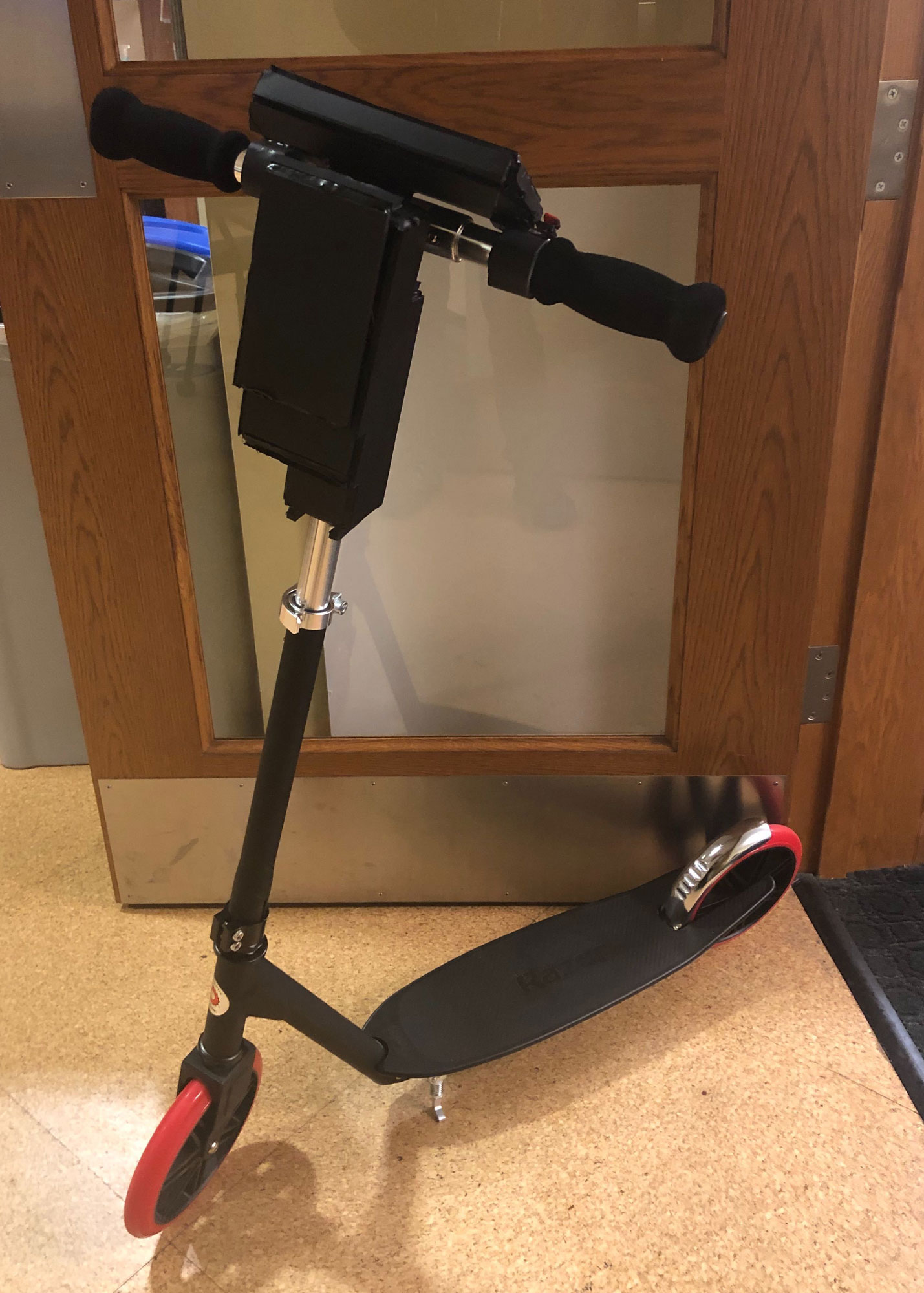
We bought an adult-sized Razor scooter and attached a mid-fidelity prototype of a built-in screen to the scooter’s handlebars. To demonstrate the prototype’s capabilities one group member rode the scooter past two simulated hazards: a crowd and a pothole and encountered a low battery alert. One group member controlled the haptic feedback and the Figma prototype shown to the driver. A second group member controlled the presentation slides, which showed the audience what the built-in screen displayed. The fourth group member delivered the presentation and narrated for the audience what was happening.
- Adult-sized non-electric scooter
- Life-size cutout of Zac Efron (to simulate a crowd hazard)
- “Pothole” made of construction paper
- Smartphone to simulate a built-in screen
- Arduino prototype with TOTOT vibrating mini motor disc and bluetooth module
- Container for Arduino/vibration mini motor and smartphone
- Figma prototype of navigational screens and alerts for the built-in screen
- Slide deck for audience
- Button on scooter
Prototyping Process
Our prototype consisted of four main elements:
Haptic feedback
Although we weren’t able to integrate haptic feedback into the actual handlebars of the scooter, we still wanted our demo to show how the alerts worked. To do this we programmed a vibration motor using Arduino Uno and a bluetooth HM-10 module. We found code online to control an LED light, which we adapted for the motors. We also downloaded a BLE terminal app which connects to the bluetooth module and communicates with the motor. The code designated the letters “F” and “N” to mean on and off. In the BLE terminal app we assigned those characters to buttons so we’d be able to quickly enter them during the demo. In order for the audience to hear the vibration we attached a small bell to the motor.
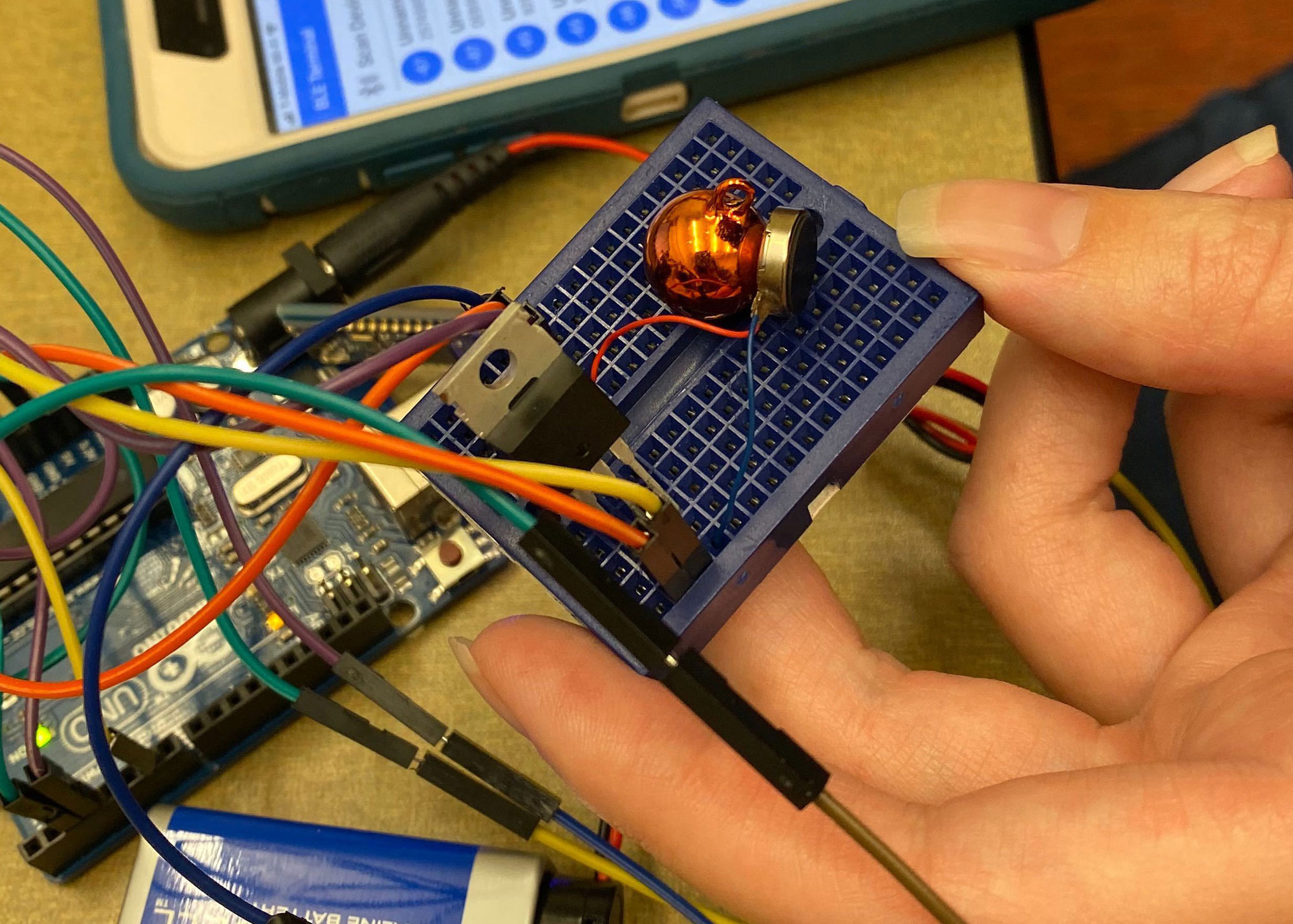
Mini breadboard with TOTOT vibrating disk affixed that is controlled by a mobile app
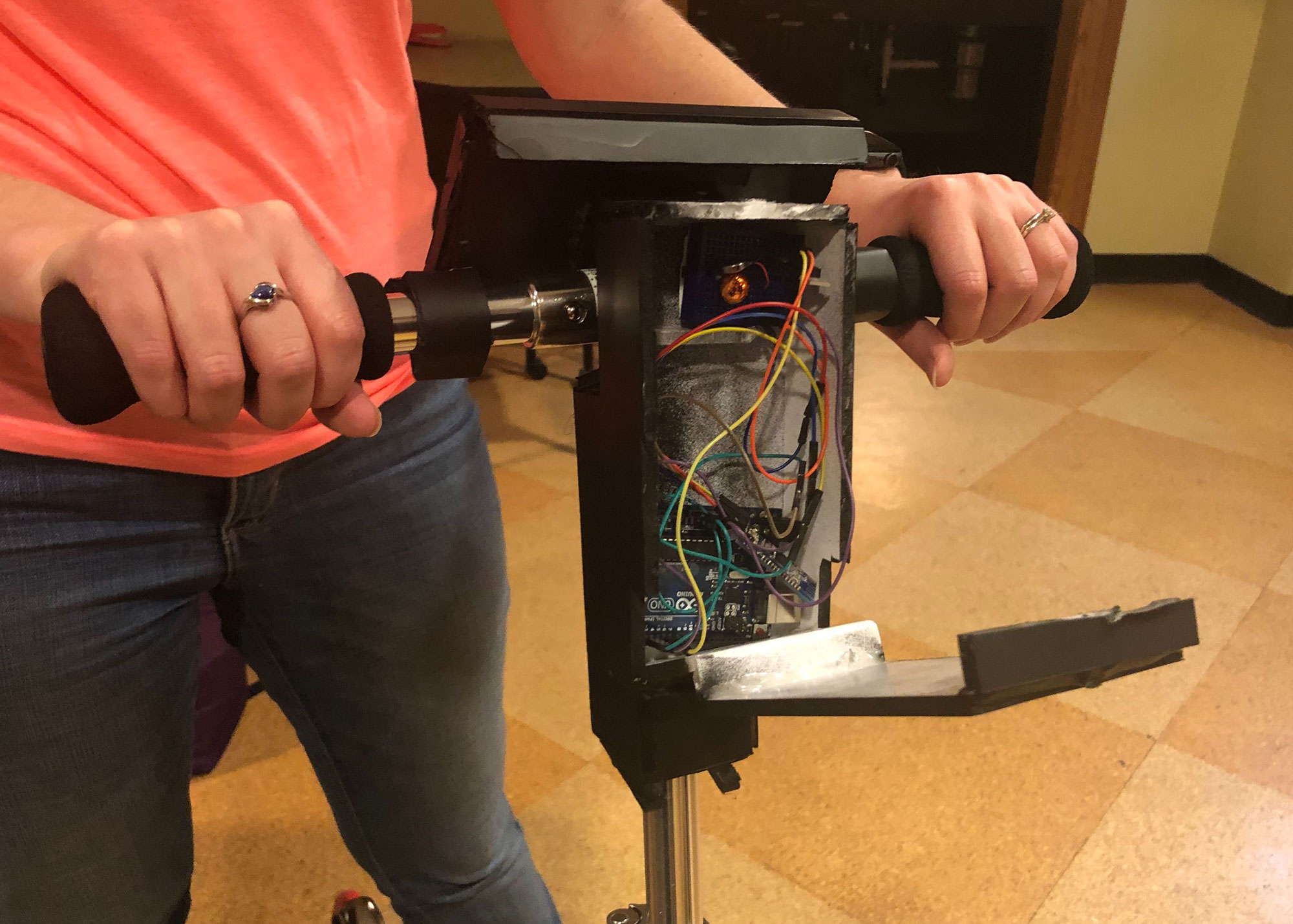
Prototype with the back panel open showing storage of wiring and boards that enable vibration
Built-in screen for scooter
To simulate a built-in screen for our scooter we constructed a container out of foam core, hot glue, and paint. This held a group member’s smart phone as well as the Arduino. The container used velcro strips so that we could remove it from the handlebars (for ease of transport), and remove the smartphone and Arduino inside it.
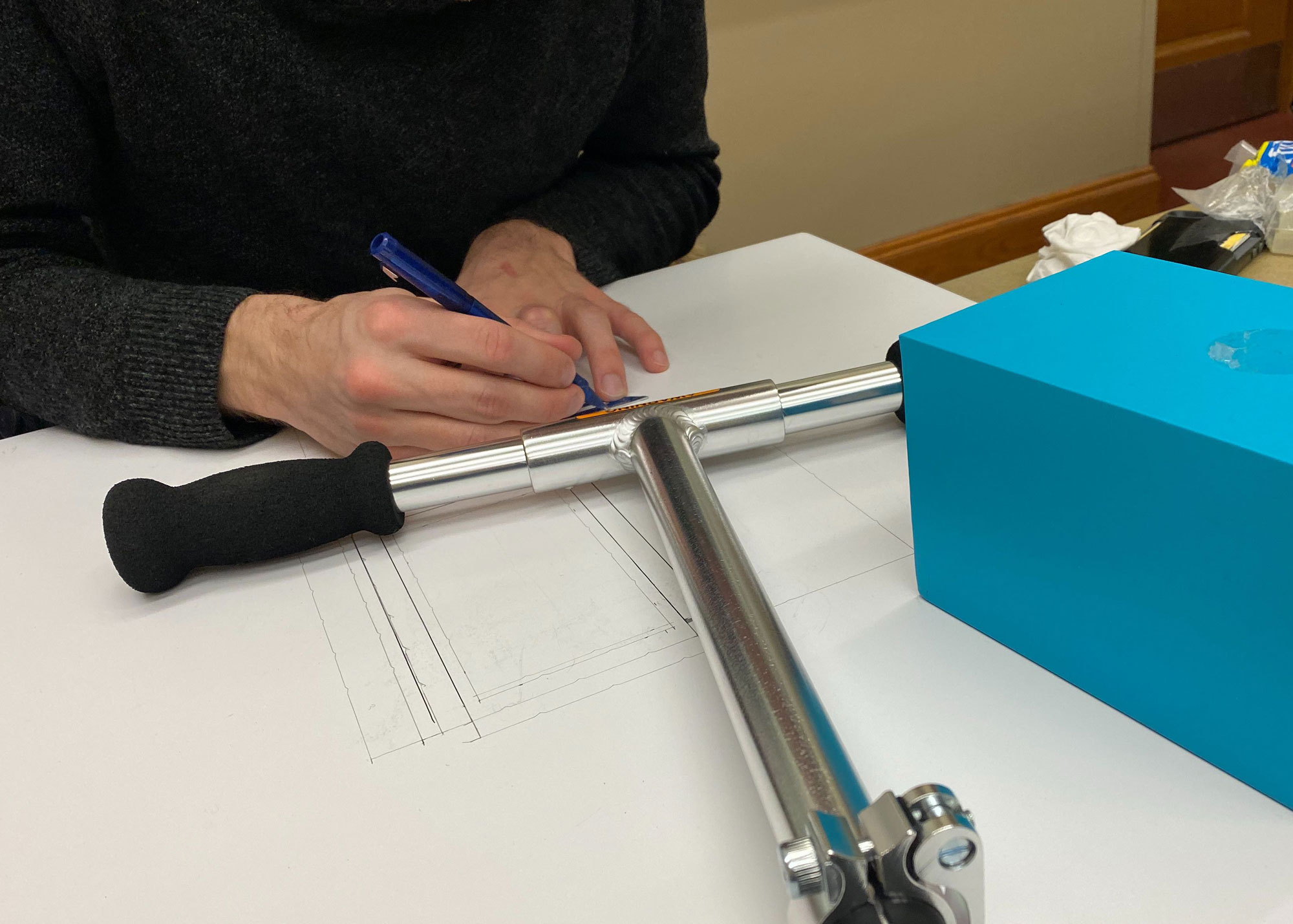
Cameron sketching and building the prototype out of foam core using the scooter handlebars as a guide
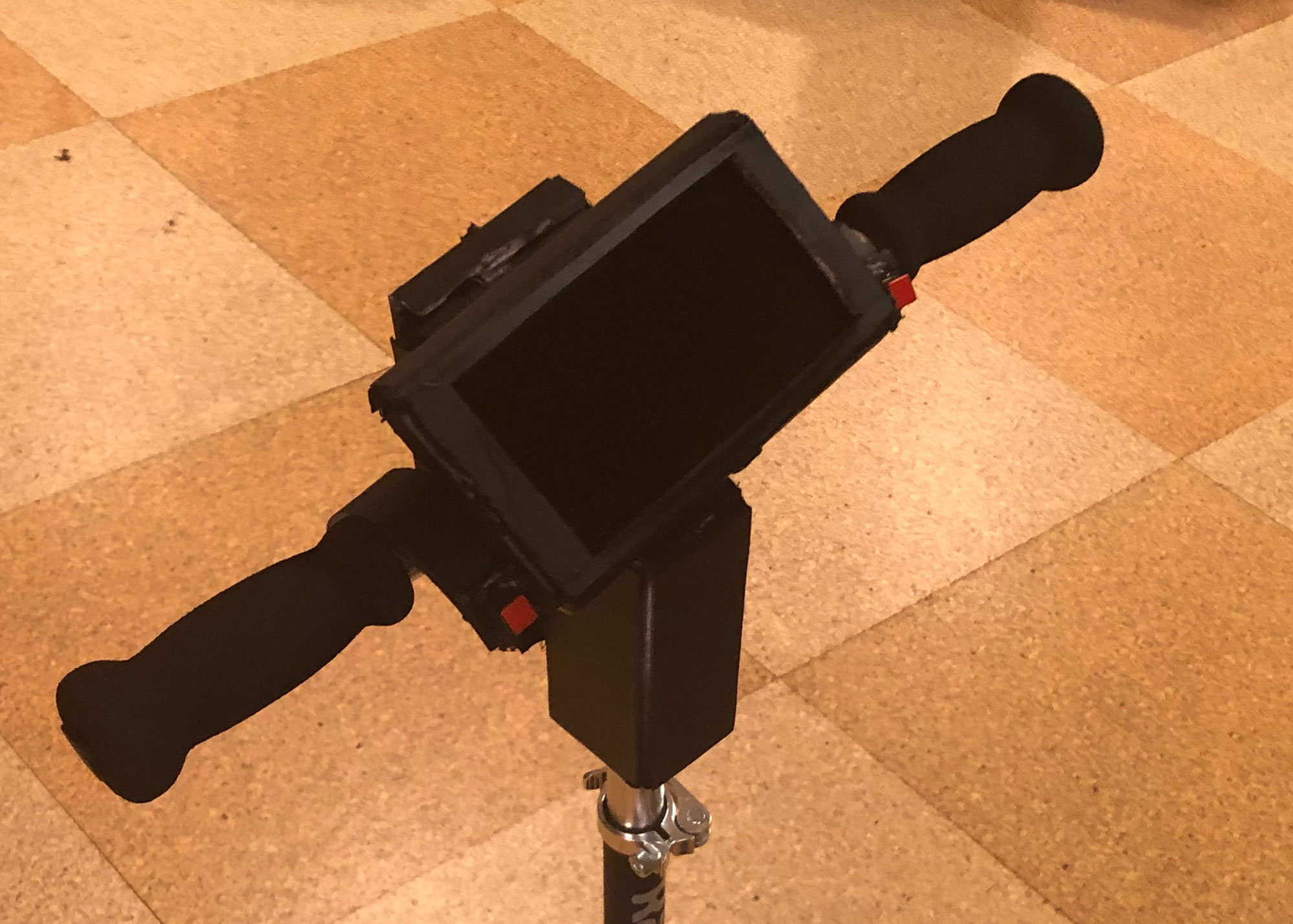
Completed prototype showing a slot to hold a smartphone to emulate a built-in screen and buttons for interacting with the system
Screen simulations
We used a Figma prototype to simulate the navigation and alerts that would display on a real built-in screen. This prototype was controlled remotely by laptop using screen mirroring. These screens showed what real crowdsourced data could produce if the accelerometer sensors and algorithms were functional.
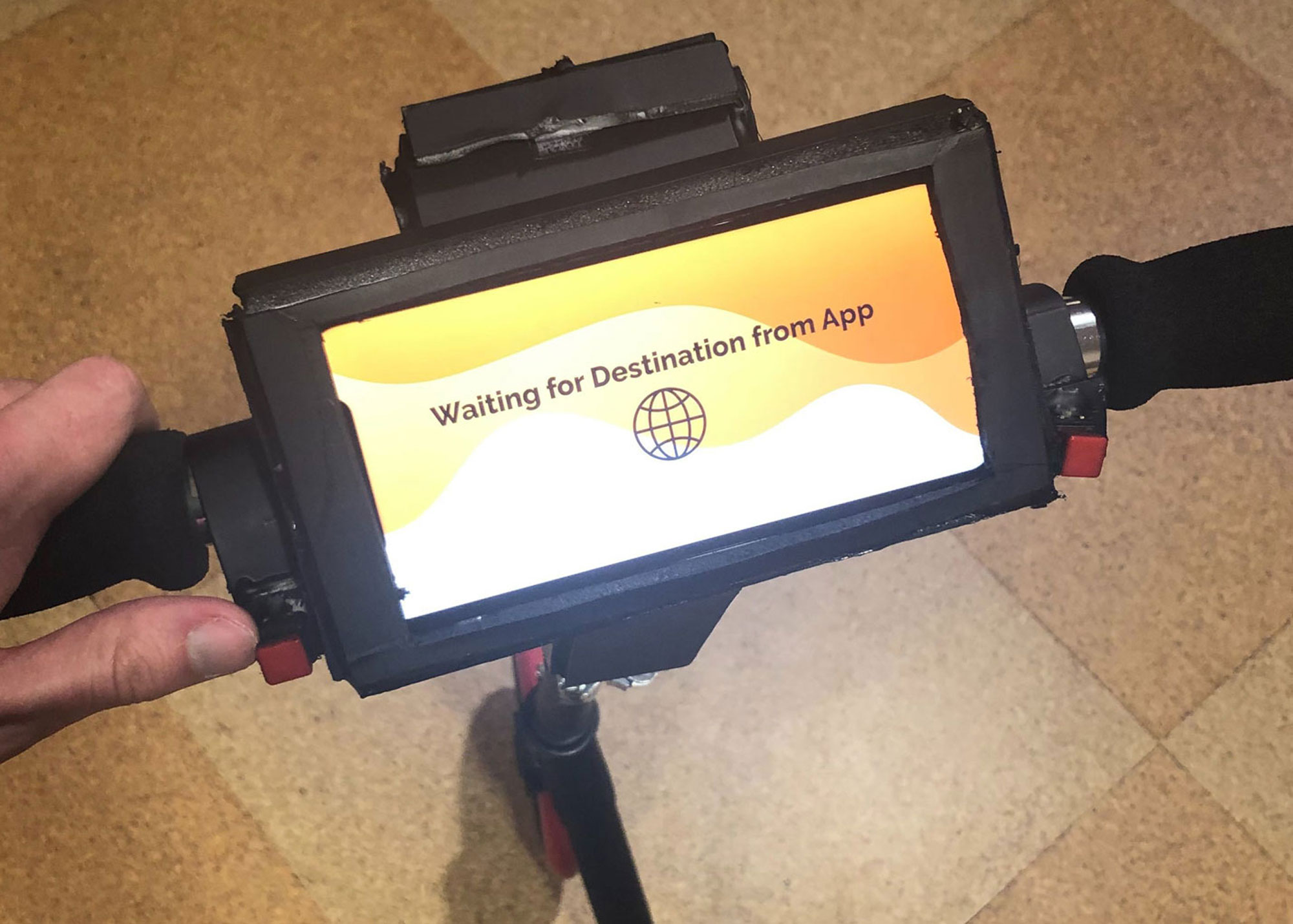
Prototype with an iPhone displaying a prototype loading screen using figma mirror
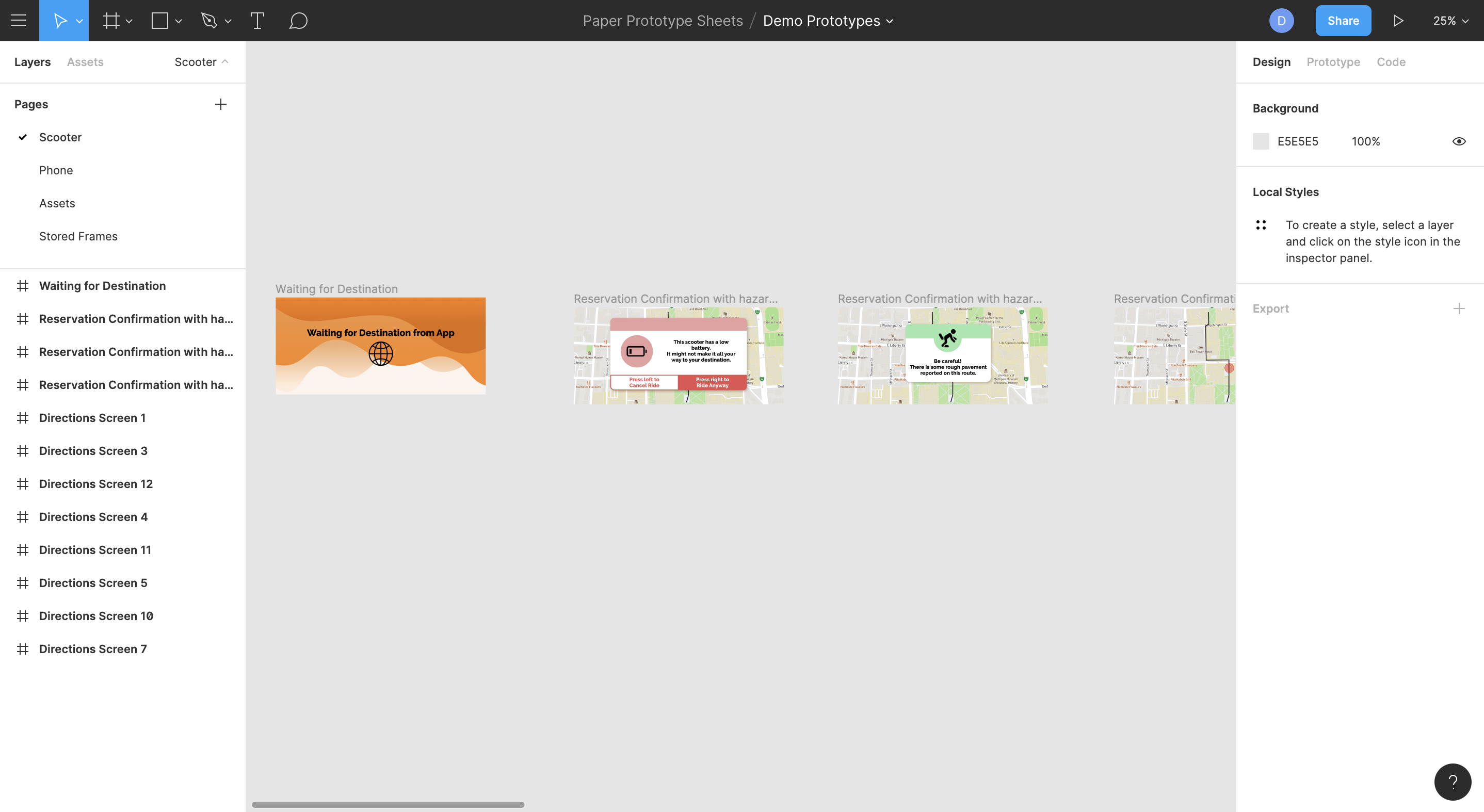
First four screens of the figma prototype demo which will be displayed on a phone inside of the prototype device
Scooter
We bought a kick scooter for the demo since electric scooters move too quickly for safe indoor use.
Demo Capture of Key Elements
Our demo was able to successfully capture a majority of the key elements of our system’s intended experience. We didn’t demonstrate every hazard due to time and feasibility constraints but we incorporated the ones that our survey and interview participants named as their biggest concerns (poor pavement conditions, pedestrians, low batteries). We showed how our system provides advance warnings with both visual and haptic alerts. We also showed an example of our system incorporating new data into the crowdsourcing algorithm. We were not able to demonstrate our concept on an electric scooter since they move too quickly for indoor demonstrations, but we look forward to using one for our Milestone 5 video.
Feedback and Insights
The creation of our demo was challenging in a number of ways and required careful consideration as we planned it out. The first challenge we faced was how demo device that is large, fast, and requires a larger space than is typically available for a small demo environment. As mentioned previously, we decided to use a non-electric scooter as it allowed us to maneuver slowly and have control over the perceived passage of time and distance in our demo which demonstrates an abridged trip from Hatcher Library to North Quad.
Our second challenge was how to improve the haptic feedback portion of our demo. The TOTOT mini motor disks were very powerful but the wiring was quite fragile so we needed to create an enclosure that wouldn’t require the wires to be too constrained or cause them to slip out. Additionally, because haptic feedback is a form of communication that couldn’t be conveyed to a demo audience we needed some kind of indicator that our device was vibrating that could be perceived by viewers. We were able to develop a prototype that gave ample space for the disks to vibrate and we affixed a small bell on the disk so that it could be heard while vibrating.
The third challenge that arose was how we would show a relatively small screen to a group during the demonstration so that an audience would be able to see what a rider sees. We initially floated the idea of wearing a video camera and showing a live feed. However, after discussing the idea and speaking with Stephanie, we determined that it was a risky approach and decided to use a slide deck that had each of the screens imposed on a photograph of the prototype.
Finally, we discussed at length the nuance required to use haptic feedback as a communication method. While this wasn’t specifically related to the demo, as it takes place in an optimal environment without much “road noise” or high speeds, it was something that needed to be addressed. Specifically, we defined a system of long and short repeated vibrations that would be distinct enough to detect even while in motion over bumpy terrain. We mentioned this system briefly in this document, but we will also expand upon this in future documentation were appropriate.